← All apps and tools

Harborlight

Notifier for Zabbix

In development

See what is wrong in your network, without keeping Zabbix open all day.

Harborlight is a desktop app that brings your Zabbix alerts together in one calm panel. A new problem gets a short pop-up, quiet moments get a snooze button, and Harborlight shows which problems are on their way in the coming week.

  • Windows first, then Mac and Linux
  • Zabbix 7.0 to 8.0
  • Free up to 25 hosts
  • English, Dutch, German and French

Why we are building it

Zabbix knows everything. You just don't see it in time.

Zabbix is a strong monitoring system, but it lives in a browser tab. And that tab is never the one you are looking at. E-mail alerts end up in a folder, Windows notifications disappear into the action center, and on a busy day you only find out about a problem when someone calls.

We first built a simple tool that turned Zabbix alerts into Windows notifications. It helped, but it also made the noise worse: every alert looked the same and nothing was grouped. Harborlight is what came next.

One panel on your desktop that shows what is really going on, and only taps you on the shoulder when something new happens.

  • You see at a glance how many problems are open and how serious they are.
  • A new problem gets a pop-up, without taking over your keyboard.
  • You know what is coming before the trigger fires.

How it works

A working day with Harborlight

All screenshots come from the current build, connected to our own Zabbix test environment with demo hosts.

01

Everything in one calm panel

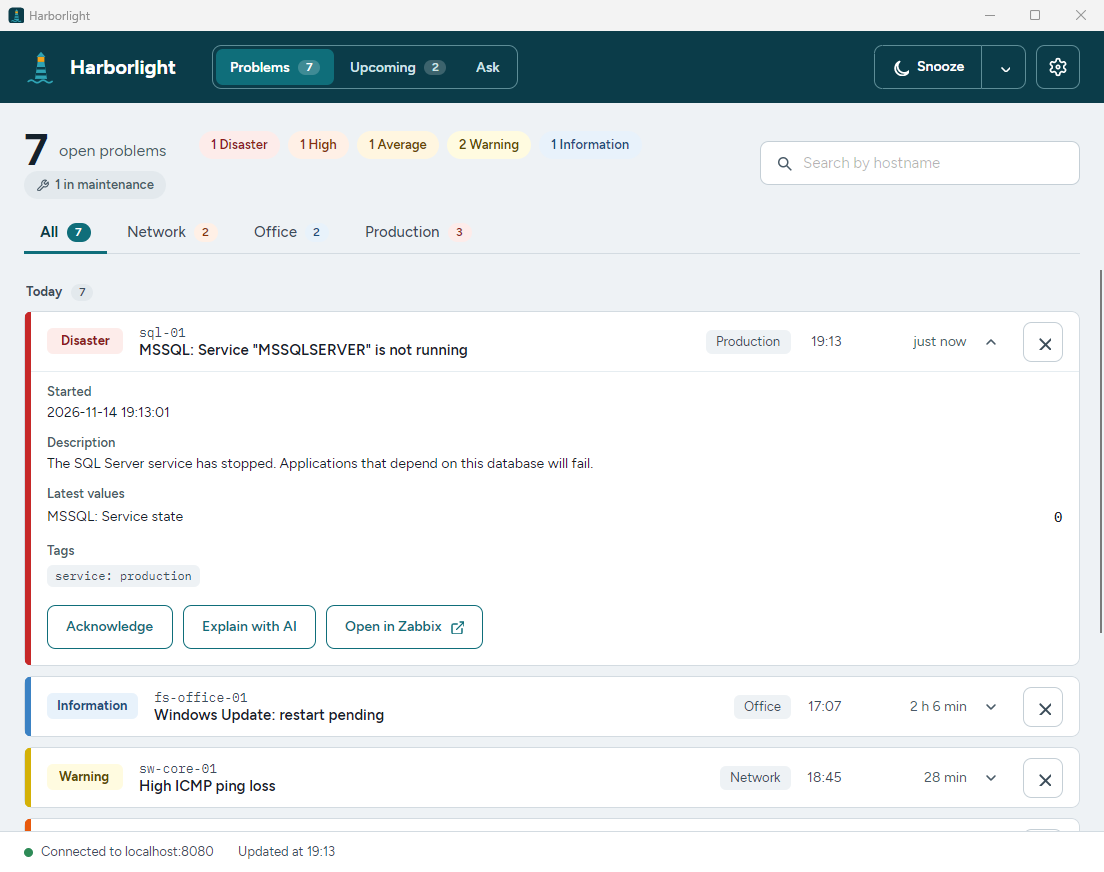
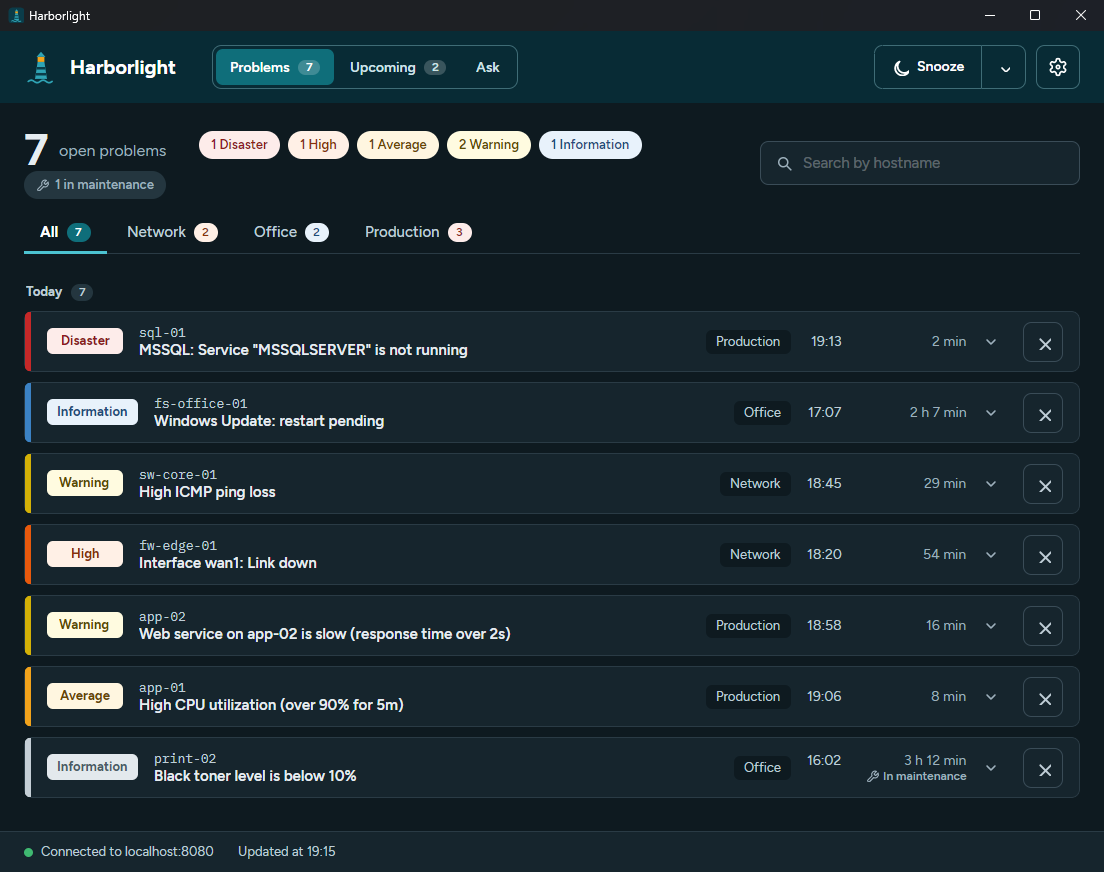
Open Harborlight and you see straight away how many problems are open, sorted by day, with a colour per severity. Each host group gets its own tab, and you search by host name.

  • Counters per severity at the top
  • Hosts in maintenance in grey, without pop-up or sound
  • Light or dark, whatever you prefer
  • Lives in the system tray, with a counter on the icon
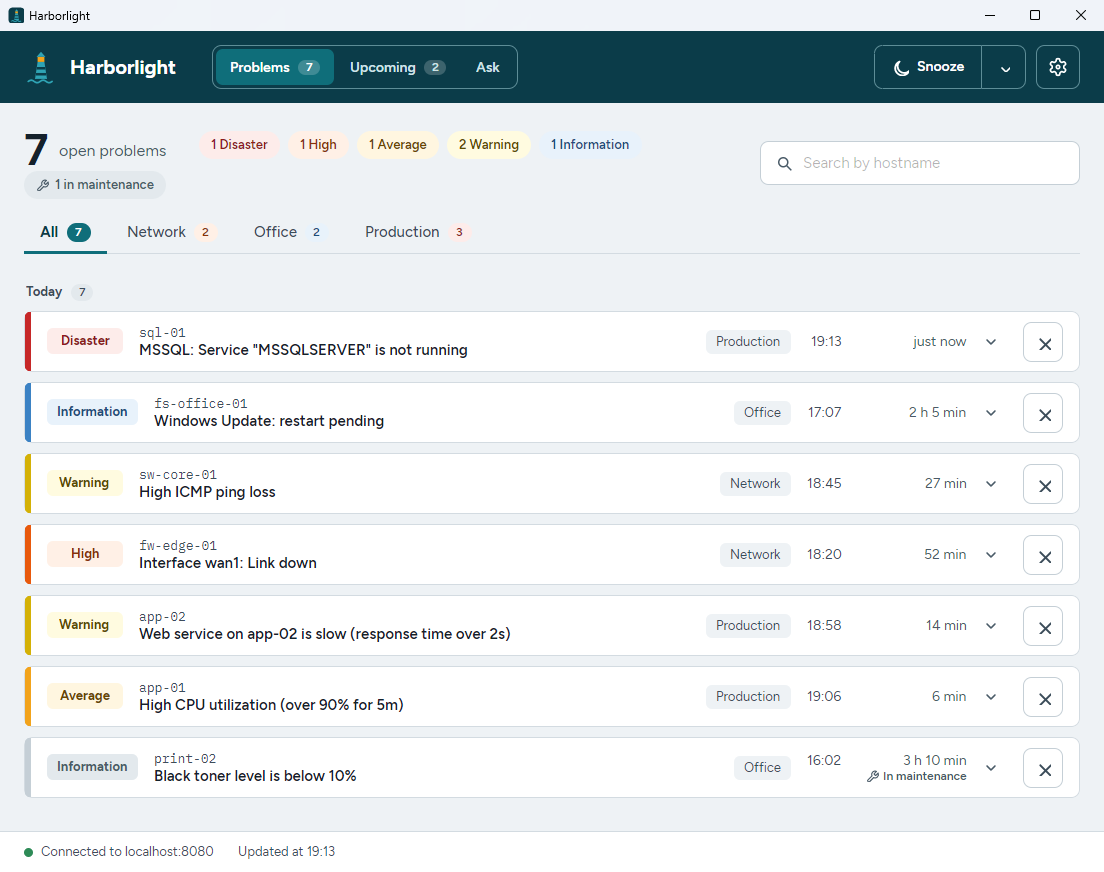
The Harborlight panel in the light theme with seven problems, tabs per host group and counters per severity.
The panel in the light theme. At the top you switch between Problems, Upcoming and Ask.
02

A tap on the shoulder, only when it matters

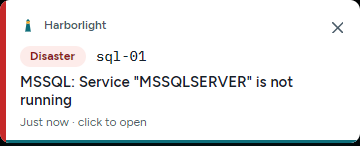
When a new problem starts, a small pop-up appears at the bottom right of your screen, with an optional sound. Click it and Harborlight opens that exact problem. It never steals focus, so you can keep typing.

  • Snooze for 15 minutes up to "until I turn it off", also after a restart
  • At most three pop-ups at once; more becomes one summary
  • A message when the connection with Zabbix drops, and when it is back
  • Choose the minimum severity, per host group or per host
Pop-up: Disaster on sql-01, MSSQL: Service MSSQLSERVER is not running. Just now, click to open.
The pop-up counts down and stays put while your mouse is on it.
03

All the details in one click

Click a problem and it unfolds: when it started, the description from the trigger, the latest values, tags and comments. Need more? "Open in Zabbix" takes you straight to the right page.

  • Acknowledge in Zabbix with a comment, only if you switch it on
  • See who acknowledged a problem
  • "Explain with AI" asks Claude what is going on (Pro)
An opened problem on sql-01 with start time, description, latest value, tags and the buttons Acknowledge, Explain with AI and Open in Zabbix.
A Disaster on the database server, opened in the panel.
04

See problems coming

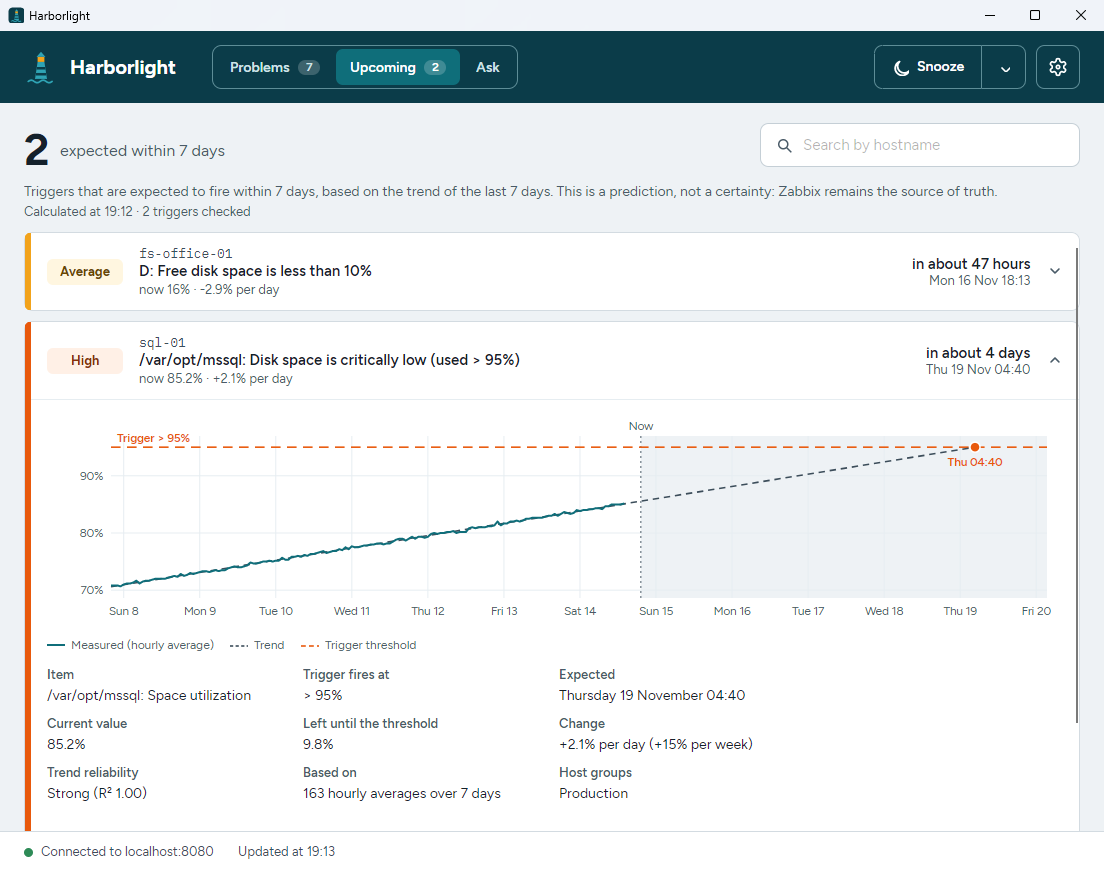
Under Upcoming, Harborlight looks at the trend of the past week for your triggers and calculates which ones are likely to fire within 7 days. A disk that fills up a little every day shows up here days before Zabbix raises the alarm.

  • A chart with the measurements, the trend line and the threshold
  • Only trends that fit well; a prediction, never a certainty
  • Works on your existing triggers, without extra setup in Zabbix
Upcoming: the data volume of sql-01 is now 85.2 percent full and grows 2.1 percent per day. The chart shows it will pass the 95 percent threshold in about 4 days.
The data volume of sql-01 reaches its 95% threshold in about 4 days.
05

Ask Claude about your monitoring

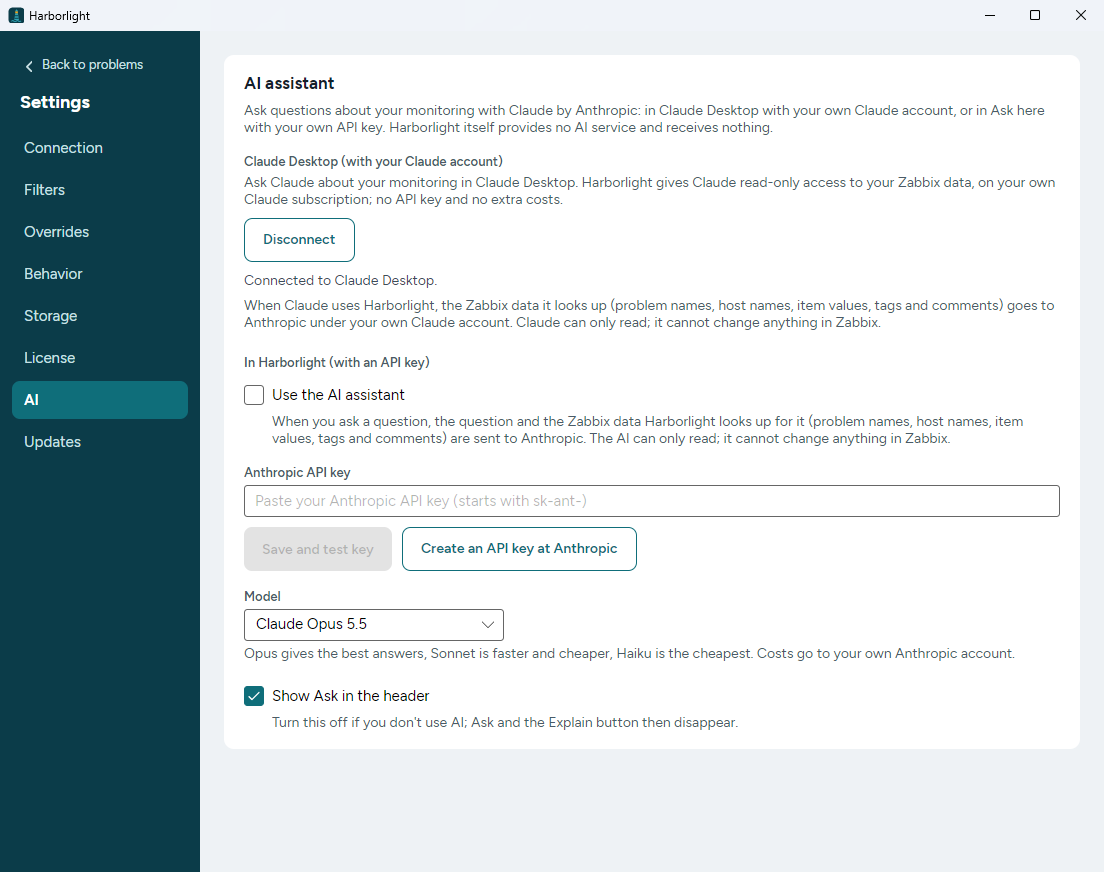
With a Pro license you can ask questions in plain language: "Why is app-01 slow?" or "Which disks are filling up?". Harborlight looks up the data in Zabbix for Claude and shows which data it used.

  • In Claude Desktop, on your own Claude subscription, without an API key: one button to connect
  • Or in Harborlight itself under Ask, with your own Anthropic API key
  • Claude can only read; it cannot change anything in Zabbix
  • Your Zabbix server does not have to be reachable from the internet
Settings, AI section: connect to Claude Desktop with your own Claude account, or use the AI assistant in Harborlight with an Anthropic API key and a choice of model.
You choose: Claude Desktop with your subscription, or Ask in Harborlight with your own key. Both are off until you switch them on.
06

Set up once, then leave it

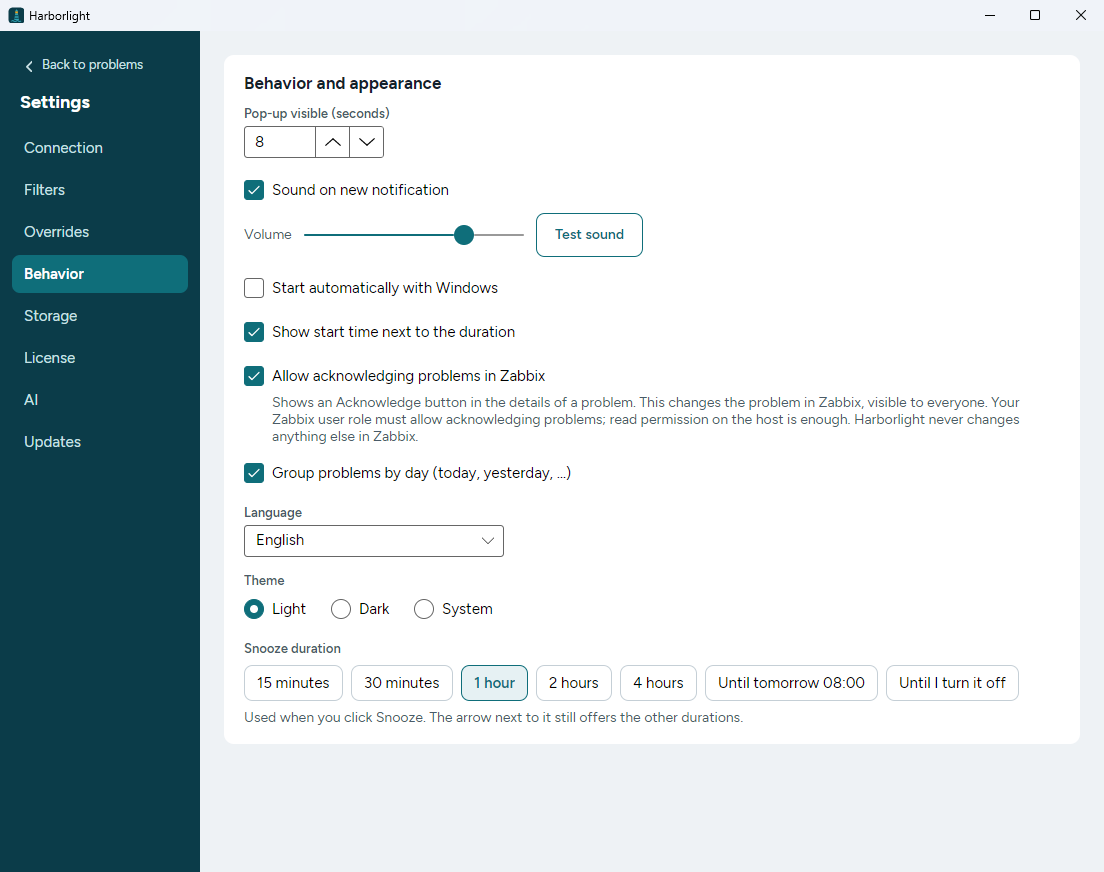
Connect with an API token or a username and password, pick the host groups you want to see and you are done. Everything else is optional.

  • Exceptions per host and per host group
  • Sound, start with Windows, problems grouped by day
  • Export your settings and import them on another computer
  • Token and password stored encrypted on your own computer
Settings, Behavior and appearance: pop-up duration, sound and volume, start with Windows, acknowledging problems, language, theme and default snooze duration.
Behavior and appearance: language, theme, sound and the default snooze duration.

What we pay attention to

Your monitoring stays yours

Monitoring data says a lot about your network. That is why Harborlight does as little with it as possible.

  • Read-only by default

    Harborlight reads from Zabbix and changes nothing there. Acknowledging a problem only works once you switch it on yourself. A ready-made Zabbix role gives it exactly the rights it needs.

  • Works in closed networks

    The license key is checked offline on your own computer. Harborlight does not need to reach us to keep working.

  • Your AI, your data

    We provide no AI service and receive nothing. You connect your own Claude account or key, and you see which data goes to Anthropic before you switch it on.

  • Settings stay local

    Your host groups, exceptions and dismissed alerts are stored on your own computer, not in Zabbix and not with us.

Free and Pro

Start for free, grow when you need it

The free version is complete for small environments. Pro is for larger networks and for looking ahead.

Free

Up to 25 hosts

  • Alert panel with tabs per host group
  • Severity filters and exceptions per host and host group
  • Pop-up for new problems, sound and a snooze button
  • Details, Open in Zabbix and acknowledging, if you switch it on
  • Light and dark theme, four languages

Pro

With a license

  • Everything in Free, without the 25-host limit
  • Upcoming: problems expected in the next 7 days
  • Ask and "Explain with AI", with your own Anthropic API key
  • Connect to Claude Desktop, on your own Claude subscription
  • Later: sign-in with Entra ID
  • Try it free for 30 days

The 25 hosts count within the host groups you choose to show.

Where we are now

Working, almost ready to install

The Windows version works and is tested against Zabbix 7.0 and 8.0. Now we are making it ready for release: an installer, code signing and automatic updates, so you can install and update it safely.

  1. DoneDesignLook, features and data handling.
  2. DoneFirst version for WindowsAlert panel, pop-ups, snooze, settings and four languages.
  3. DoneUpcoming problems and licensesA look ahead at the next 7 days, and free up to 25 hosts.
  4. DoneClaude and Zabbix 8.0Ask, Explain with AI and Claude Desktop, tested against Zabbix 8.0.
  5. NowReady for releaseInstaller, code signing and automatic updates.
  6. NextMac and LinuxAfter the Windows version.

Want to try Harborlight as soon as it is released? Send us a message.

Tell me when it is out

Harborlight is an independent product by BedrockDock and is not affiliated with Zabbix LLC. Zabbix is a trademark of Zabbix LLC.